
|
WinShortcuts 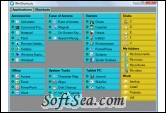
|


An application that helps you to launch your programs easily and to organize your shortcuts. You can see all your applications with launched state on one screen. There are separate panes for shortcuts to folders and files. Shortcuts can be added by a simple drag-and-drop operation and launched with a single click.
WinShortcuts is a powerful application launcher and shortcut manager. It allows you to manage a list of shortcuts to applications, folders and files and launch them in a quick and convenient way. Shortcuts to applications are shown along with launched state indicator. Shortcuts can be added by dragging them into the application window and launched from there with a single click (no need to open a series of menus).
Have you ever noticed the chaos in which application shortcuts usually exist Applications are launched with a bunch of shortcuts on the desktop, in the Start Menu, the Quick Launch bar, etc. No wonder it is so difficult to find something when you need it.
Keep your desktop clean and let WinShortcuts take care of your shortcuts. WinShortcuts brings order to your shortcuts by allowing to group items by categories (e.g. "Internet", "Games" etc.). Now you can have only one location for storing your favorite shortcuts in an organized manner.
But this is not just about application shortcuts. With WinShortcuts, you can add a shortcut to any file or folder on your computer. For your convenience, you can place a shortcut into a separate group along with other logically related shortcuts.
WinShortcuts enables you to:
* Create shortcuts to applications, folders and files.
* Keep your shortcuts in one place.
* Organize shortcuts by grouping them into logically related categories.
* Assign keyboard shortcuts
The license of this software is Free Trial Software, the price is $14.95, you can free download and get a free trial.