
|
MouseLaunch 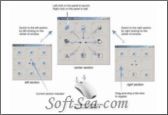
|


MouseLaunch is a unique application launcher that is activated by clicking both your mouse buttons at once. While that may be handy, it does not offer much beyond that - add up to 24 files or folders to the basic launchpad by drag and drop.
* Quickest & intuitive launching
You can activate the launcher by holding down both mouse buttons at any location in Windows.
Once the launcher activated, move the mouse cursor a little to the registered program/file (eight-direction) and click to launch.
Once you experienced, it will takes less than 1 second for entire action.
After you launch a file, the launcher will be minimized automatically not to disturb your further operation.
* Drag-and-Drop registration
MouseLaunch supports a drag-and-drop to register your favorite programs and files to the launcher panels.
You can drag and drop a file from desktop area, Start menu, Quick Launch area, Windows Explorer and even from the favorites of the Internet Explorer.
You can register up to 8 files for one section and change the location freely by right-clicking at the panel.
* Multi-Section support
MouseLaunch supports 3 sections - center, left, right and with SHIFT key combination, you can register/launch up to 48 files quickly.
* Special Panels
MouseLaunch supports special panels - Emailer, Text Clipboard - that enable you to send email and copy multi-line text to the clipboard quickly.
The license of this software is Free Trial Software, the price is $24.00, you can free download and get a free trial.