
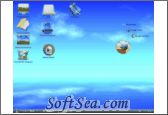
Desktop3D

Desktop3D Screenshot
  • Rating: Desktop3D Rating
  • Version: 2.0
  • Publisher: www.yokersoftware.com
  • File Size: 13.15 MB
  • Date: Dec 06, 2007
  • Price: $19.95
  • License: Free Trial Software
  • Directory:
Desktop3D Download
Free Download Desktop3D 2.0

Desktop3D 2.0 is a Desktop Utility product from yokersoftware.com, get 4 Stars SoftSea Rating, Desktop3D replaces your standard XP/Vista desktop into a less cluttered desktop with animated background and large icons. The 3D desktop only displays 6 default icons, and your original desktop icons can be accessed via a shortcut to the desktop folder. The desktop environment looks nice, but unfortunately lacks much of the functionality of the standard desktop, such as certain right-click menu options, the capability to hide icons and more. Overall, not recommended unless you are willing to give up common desktop features for some additional eye candy, or if you want a feature limited desktop alternative for your kids. SoftSea.com had fully tested, reviewed and uploaded the install files, Desktop3D does not contain any adware or spyware, the latest version is 2.0, you can download this desktop utility software (13.15 MB) from special server of SoftSea.com. The license of this windows utility software is Free Trial Software, the price is $19.95, you can free download and get a free trial before you buy. If you want to get a full or nolimited version of Desktop3D, you can buy this windows utility software.

Desktop Utility Software Related Titles:
SendTo Magic
This software allows you to use the Send To menu for copying and moving files, creating shortcuts and ZIP files, and uploading files to FTP sites.

Magnifixer
Magnifixer is a screen magnifier utility.

Hovermenu
Launch your most-used applications and system control tools without creating customized shortcuts and bars, from a single intuitive interface.

LaunchTab
This program is a simple, but attractive software launcher that attaches to your taskbar, and provides tabs, that reveal shortcuts to your favorite programs, documents or web sites.

ShellToys
CFi ShellToys puts the tools you need right where you need them - just a click away on your context

PfiOO
This program is a website launcher for a quick and discreet browsing, that allows you to enter website addresses without saving them in you browser's address bar.

DesktopOK
Save and restore the positions of icons.

AppPlus
This menu bar and tray launcher docks to your desktop, floats, or sits in your system tray.

Batch Launcher
This software allows you to launch several applications by one click.

QuickStart
This allows you to quickly find items in your Start Menu, Favorites, Recent Files, Desktop and History, that match a typed keyword.

Device Authorisation Service
A enterprise desktop management product that offers access control to devices such as USB memory, Portable hard drives, CD-Rom.

Application As Service
This enables you to run any software as a Windows Service, using a simple interface that lets you select the file to run, set service properties, optional dependencies and other details.

Free Launch Bar
This program is a replacement for the standard Quick Launch bar, that adds additional functionality by allowing you create groups for your shortcuts enabling you to add more links without using up additional

Frix QuickRes
This program is a convenient tool, that allows you to quickly switch between 2 desktop resolutions by simply double-clicking on the system tray icon.

TurboLaunch
The fastest and easiest way to start all of your favorite programs! Start any software with just a single click; no more navigating through cascading menus in the Start button.

ToggleMINIMIZE
This program is convenient tool that lets you minimize applications as small icons beside the clock instead of taking up room on the task bar.

Accessor.Launchbar
Launch programs, and open files and Internet URLs with this desktop toolbar.

Visual Task Tips
Visual Task Tips is a convenient Windows shell enhancement that displays a thumbnail snapshot of any Wind

Responding Heads
This enables you to launch programs, commands and actions via voice commands spoken into your PC microphone.

IconTweaker
This allows you to customize Windows with different sets of icon themes.

Desktop Utility Software Related Category Page:
Page: 1   2   3   4   5   6   7   8   9   10